
new
Assortment Plan
Dashboard
Analytics
📦 Hierarchy Summary: A Single Page for a Category
What's new
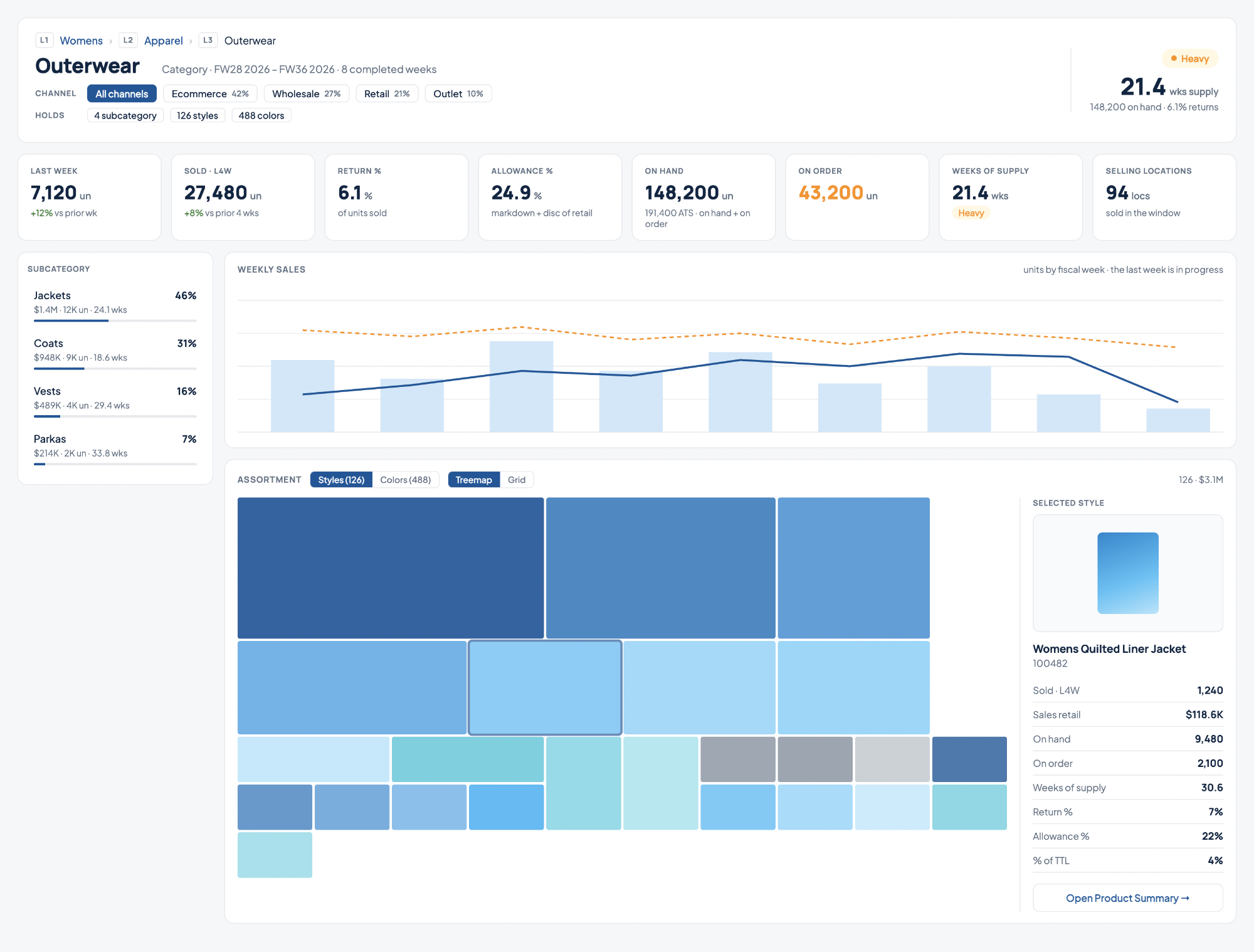
You can now open any level of your product hierarchy and see how it is trading on one screen. Pick a division, department, or category from the command bar and you get its sales, inventory, weeks of supply, and every product underneath it, without building a view or filtering a plan.
What you can do
- Open any category from the command bar– PressCMD+K, type the name, and pick it from theHierarchysection. Each result shows its full path, so a category that exists under more than one division is easy to tell apart.
- Filter the whole page by channel– Choose Ecommerce, Retail, Wholesale, or any channel you plan by, and every figure on the page follows: the KPIs, the sales trend, the breakdown, and the assortment. Each channel shows its share of the category's sales before you click.
- See what is carrying the category– The treemap sizes every style by its sales, so the products driving the business are the biggest tiles. Switch the treemap to size by on hand to see where inventory is sitting instead.
- Click into a single product– Selecting a tile shows that product's sales, inventory, weeks of supply, and share of the category beside the map, with a link through to its Product Summary page.
- Drill down a level at a time– The breakdown lists the level directly underneath, with each one's share, sales, and weeks of supply. Click through to open it, and use the breadcrumb to step back up.
- Judge the stock position at a glance– Weeks of supply comes with a Healthy, Heavy, or Overstocked reading, next to on hand, on order, return rate, and allowance rate.
Why it helps
- Answer "how is this category doing" in seconds, rather than opening a plan and building a view to find out.
- See a category the way your business is actually organised, by channel, instead of one blended number.
- Find the overstocked or dead products inside a category without scrolling a grid.
- Go from a category down to a single product, and back up, without losing your place.
Note:
Hierarchy Summary is only available for customers that have Assortment Planning. You can read more about this capability here.